No items found.
No items found.
Keeping a brand consistent across multiple teams and projects is no small feat, especially in large commercial organizations. For many leaders, making sure every presentation, slide, or report stays on-brand can feel like a full-time job.
Prezent underscored this major hurdle in enterprise business communications. With tools like the Slide Library and Template Converter, teams can quickly turn ideas into polished, professional presentations that stay true to the brand. Less stress, faster workflows, and decks that actually make your company look its best.
In large organizations, maintaining brand consistency is challenging. Decentralized teams, varied content needs, and fragmented tools often result in inconsistent logos, messaging, and design elements that weaken brand identity. Maurice Garland, former Vice President of Sales and Market Access at Global Blood Therapeutics (GBT), experienced this firsthand. He explains that their branding team consistently created high-quality presentations, but other teams often couldn’t match that level. This resulted in confusion, inconsistency, and inefficiency across the organization.
Maurice’s story isn’t the only one. In many mid-to-large companies, multiple teams, brands, and vendors contribute content, each with their own styles and habits. But when it’s time to present to leadership, every deck needs to feel like it comes from one unified source. And that’s where the challenges begin.
Professionals often find themselves dealing with issues like:
As content moves between teams and partners, these small inconsistencies multiply. They dilute the brand, increase compliance risks, and take attention away from strategic priorities. Maurice sums it up well:
“I spent more time preparing my presentation for my business review than I did in analyzing the data in my market.”
All those hours wasted on formatting, hunting for the right template, or fixing branding errors don’t have to be the norm. Prezent’s Slide Library removes that friction by giving teams one central hub of brand-approved, professionally designed slides—ready when they need them. Teams can work up to 90% faster by streamlining the presentation process.
With the Slide Library:
The outcome? Teams spend less time designing and more time telling the story that matters.
With over 35,000 slides in one centralized library, Prezent directly solves the common pain points of searching for templates, inconsistent branding, and wasted time.
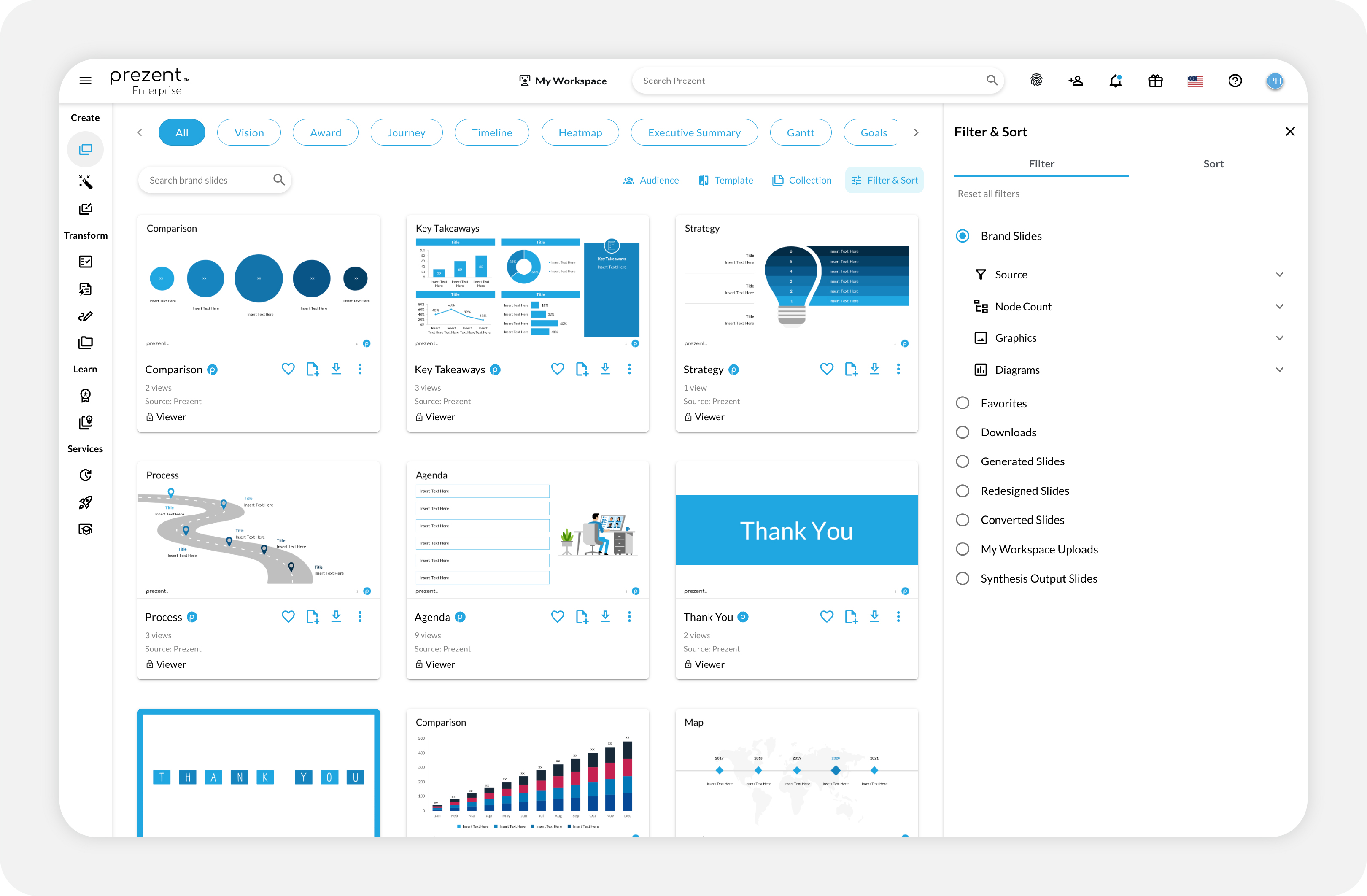
Step 1: Access the Slide Library
Log in to Prezent and open the Slide Library—a single source for thousands of ready-to-use slides covering concepts such as strategy, data, roadmaps, org charts, and more.
Step 2: Search or browse
Search or browse keywords to find slides that match your business concept or message.
Step 3: Apply filters
Use “filter and sort” to narrow results by brand, favorites, downloaded slides, or visual style, like charts or diagrams.
Step 4: Customize your slide
Select a slide and update the node count, layout, visuals, and template as desired. Prezent automatically maintains consistency in logos, fonts, and colors.
Step 5: Save for future use
Save your customized slides to your collection for quick access in future projects.
Step 6: Add to your presentation
Download the slide and add it directly to your deck. You save time while ensuring every slide is fully on-brand.
Keeping brand consistency across old decks or ad-hoc presentations can be overwhelming, especially when multiple teams and stakeholders are involved.
Erin Lutz, Principal Program Manager at Workday, experienced this challenge during a company-wide rebrand. Her team had just six weeks to update 23,000 customer-facing slides and demos.
With Prezent’s Template Converter, what seemed impossible became achievable. Instead of manually reformatting slides, the AI-powered tool instantly transformed existing decks into fresh, on-brand presentations.
Erin has become the biggest advocate of Template Converter and says:
“Prezent eliminated 80% of the manual work, so we could focus on what really mattered. The customer support was outstanding, and the tool made a huge difference in our success.”
Why teams love Template Converter:
What once took hours now happens in minutes, giving teams consistent, professional presentations across regions and departments. Whether you’re managing a rebrand, unifying slides from different teams, or handling last-minute requests, Template Converter makes it easy. Powered by Astrid AI, it reviews every detail to keep your presentation 100% aligned with brand standards.
Step 1: Open the Template Converter
Go to the Template Converter feature in Prezent.
Step 2: Upload your presentation
Add any PowerPoint file that needs rebranding or standardization.
Step 3: Select slides to convert
Preview your deck as thumbnails. Choose to convert all slides, or deselect the ones you don’t want.
Step 4: Pick a brand-compliant template
Astrid AI recommends brand-approved templates. Select the one that best fits your needs and brand guidelines.
Step 5: Check brand compliance
Instantly check your presentation's compliance with your brand standards. With one click, make it 100% compliant or review updates step-by-step.
Step 6: Apply smart recommendations
If you opt for manual review, Astrid AI suggests improvements for fonts, colors, images, and layouts. Apply them slide by slide, by category, or across the entire deck.
Step 7: Finalize and download
Once everything looks right, accept the changes and download your polished, brand-compliant presentation.
With Template Converter, you save hours of manual work, reduce errors, and ensure every presentation reflects your brand at its best.
Teams have a lot on their plates—tight deadlines, multiple priorities, and the need to communicate clearly. That’s why success isn’t just about strategy; it also depends on how well leaders enable their teams to deliver the message clearly, stay organized, and protect brand consistency.
With the Slide Library and Template Converter, your teams can create polished, professional decks that stay true to your brand—without losing time or energy. Instead of worrying about consistency, you can focus on what matters most: the message, the audience, and the impact.
See the difference for yourself. Schedule a demo with our experts or start your free trial today to experience how Prezent helps enterprise teams achieve brand consistency at scale.
.webp)
Supriya is a Content Strategist and Creator at Prezent AI with extensive experience in brand storytelling, digital strategy, and B2B content. She has worked across SaaS and technology-driven businesses, building content engines that drive awareness, engagement, and pipeline growth. Passionate about crafting clear, insight-led narratives, Supriya focuses on turning complex ideas into compelling stories that resonate with modern business audiences. You can connect with her on LinkedIn.













