blog
December 2, 2022

Why your presentation needs an executive summary

A concise executive summary slide will help your synopsis stand out before your presentation even begins.

Senior executives have (ridiculously) full schedules.

Research shows that senior executives and managers spend an average of nearly 23 hours per week in meetings, and that doesn’t include impromptu check-ins that don’t get scheduled in advance.

This means when you meet with your executive team, you need to make your presentation stand out. And the best place to start when putting together an effective presentation is with a solid executive summary slide.

What is an executive summary?

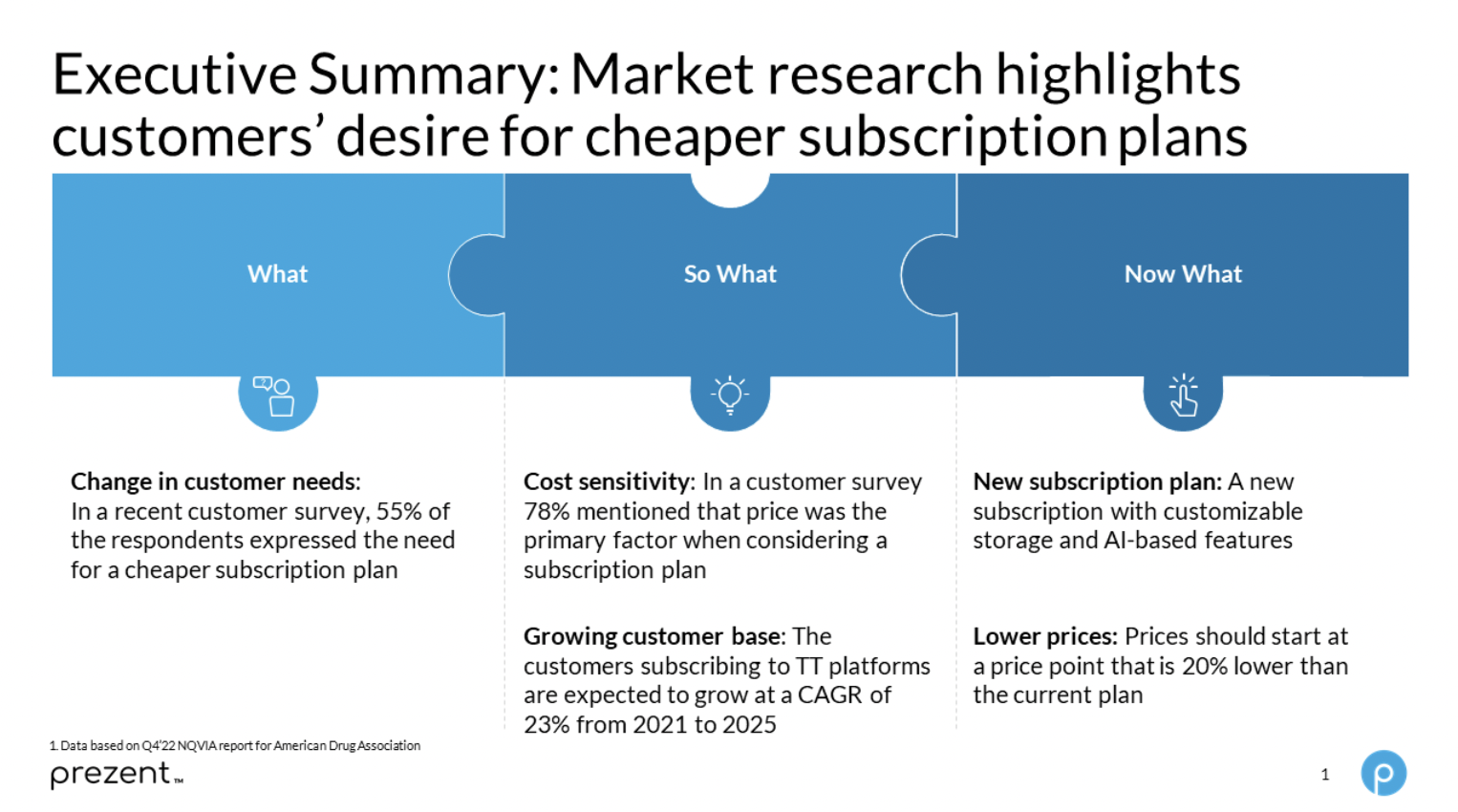
The executive summary is an overview of your bigger presentation. It should introduce your audience to the topic you plan to discuss, as well as any major details or steps. Avoid including charts or data in your summary. The purpose is to provide a high-level outline of what you will cover in your presentation so your audience feels prepared to follow along.
How to craft an executive summary slide

With an effective executive summary slide, your audience should quickly understand what you’re about to present before you begin. Here are some best practices to help your synopsis stand out:
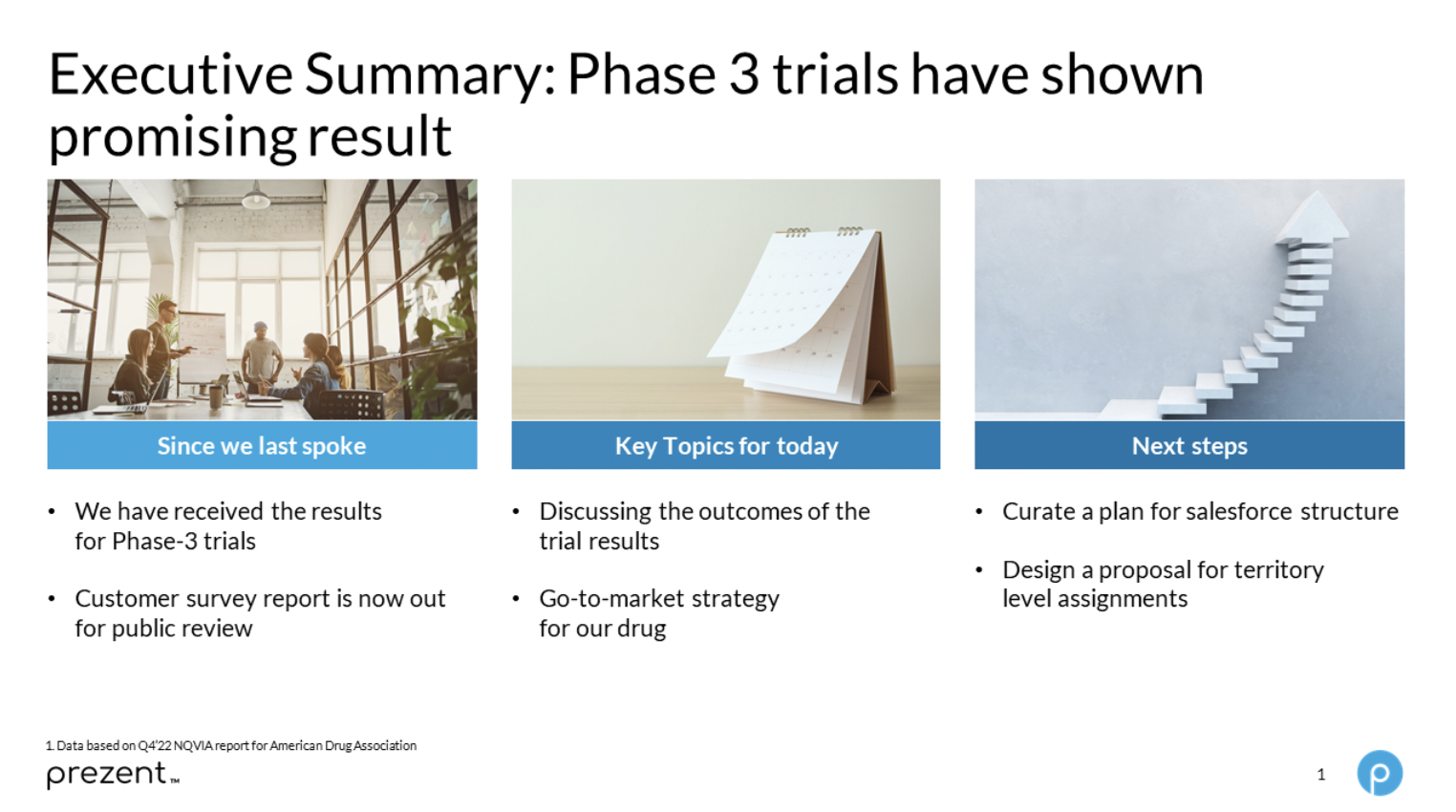
  • Use action-oriented headlines. This is especially important if you’re reporting on the end stage of a project.
  • Include relevant background information. If you’re providing project updates or meeting regularly, “Since we last spoke” is a helpful indicator to acknowledge progress and results.
  • Provide an agenda. List out your key topics for discussion and propose next steps.
  • Highlight notable results and recommendations. These should be the important takeaways you want the executive team to remember after the meeting ends.
  • Brevity is key. The executive summary should be brief and easy to read, with not too much text or visual distractions. To achieve conciseness, a summarizer tool can work well.

Executive summary stages

Not all executive summaries are the same. Some are surface level and explain what’s involved in a project before work starts. Others are more complex and are used to persuade stakeholders or report progress to ensure your path forward is the right one.

If you’re giving executive presentations frequently (for example, monthly project updates), you should still include an executive summary at the start of each presentation. However, the context of your summary should adapt as you move through different project stages.

Early-stage executive summary

An early-stage summary aligns the team around the core problem or core question needing to be solved. The summary can be broken down into three parts:

  • Context. The aim is to make your team (or audience) feel heard and ensure nothing is missing going forward. 
  • Core question. The second part of the summary confirms the core question to be solved or sparks a discussion about what question(s) should be asked.
  • Next steps. The final part outlines next steps and can also be used to preview hypotheses and gather early reactions from the team.

Mid-stage executive summary

Mid-stage summaries highlight progress. They also have three core parts:

  • Actions. The actions made since the last presentation with the early-stage executive summary. Each action should outline progress made since the first meeting.
  • Insights. Any relevant insights gathered since the last meeting, including any changes or new information. This section should generate discussion.
  • Next steps. This section outlines what will be achieved before the next meeting.

End-stage executive summary

The end-stage executive summary aligns teams around a conclusion. As this summary is often the final one given on a project, the components are more complex. Here are three different approaches you can use to build an end-stage summary: 
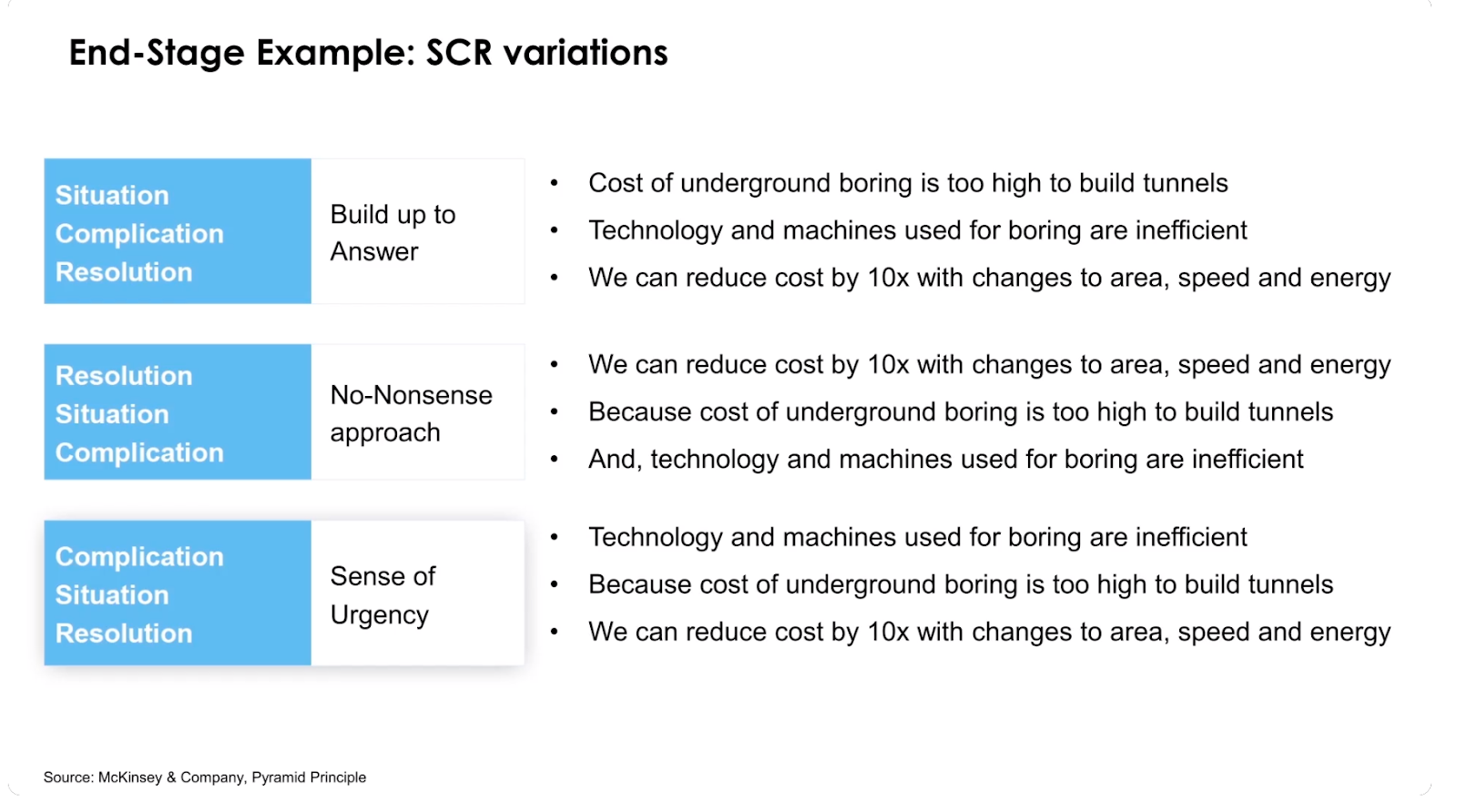
  • Situation-Complication-Resolution. Used when the summary builds up to the answer. This summary is ideal if you expect opposition from stakeholders or if they're being presented with a potentially controversial conclusion.
  • Resolution-Situation-Complication. A variant of the previous summary, this approach is used to resolve complex situations. Use it if your team is hungry for answers and has a common understanding of issues. 
  • Complication-Situation-Resolution. This approach creates a sense of urgency within a team. It's most effective when a resolution is yet to be decided, and it helps pave the way for a project's next steps.

To learn more about executive summary stages, check out our Learning Guide!

Set up your presentation for success

With a strong executive summary, you’ll be ready to impress and take the lead in your next presentation. Prezent—an AI-powered executive summary software and productivity platform—can help you supercharge your executive summary slide with pre-built slide templates created with your brand-approved designs.

With the current digital world, ensuring the security of your communication is crucial, especially when sharing sensitive business insights. A reliable VPN service can help protect your data and maintain confidentiality during remote presentations or virtual meetings.

The Prezent software also features built-in opportunities to learn more about the art and science of effective communication, so you can upscale your business communication skills while building better presentations faster.

Want to ace your next executive presentation? Our e-book holds the seven keys you need.

Learn how Prezent can help you enhance your executive presentations. Sign up for our free trial or book a demo today!

Ready to create impactful presentations?

Try for free

Related resources

BLOG
Bharti Jain
December 18, 2025
Brand Chaos ends here: How Prezent’s Template Converter solves enterprise brand compliance
Enterprise teams struggle with off-brand presentations. See how Prezent’s Template Converter automates brand compliance without slowing teams down.
BLOG
Tom McCarthy
December 16, 2025
Why I’m joining Prezent: Democratizing world-class business communication
Legendary high stakes coach Tom McCarthy joins Prezent to bring AI Communication Coaching to teams through interactive coaching avatars.
BLOG
Anoob P.T
December 16, 2025
Tom McCarthy joins Prezent: Scaling business communication coaching with AI avatars
Prezent partners with high stakes coach Tom McCarthy to scale communication coaching with interactive AI avatars.
BLOG
December 9, 2025
The smartest way to brief your presentation AI: Meet Prezent’s Prompt Library
Stop guessing what to write. Prezent’s Prompt Library gives you expert-built prompts, storylines, and structures that transform scattered notes into compelling presentations.
BLOG
Supriya Sarkar
December 3, 2025
Prezi vs Canva vs Prezent: The 2026 enterprise guide to scalable presentation solutions
A 2026 guide comparing Prezi vs Canva vs Prezent to help enterprises choose smarter, scalable presentation solutions.
BLOG
Supriya Sarkar
November 26, 2025
Storytelling with data and AI: Bridging the gap between data teams and business leaders
Explore key takeaways from Articulate 2025 on how AI-driven data storytelling is transforming enterprise communication—bridging teams, leaders, and business outcomes.
BLOG
Supriya Sarkar
November 20, 2025
Prezi vs Google Slides vs Prezent: Which presentation tool works best for enterprise teams in 2026?
Compare Prezi, Google Slides, and Prezent to find the best enterprise-ready presentation tool for 2026.
BLOG
Rashmi Priya
November 18, 2025
Beautiful.ai vs Canva vs Prezent: The battle for business storytelling and what enterprises should know
Compare Beautiful.ai vs Canva for enterprise storytelling. Learn which platform delivers true brand control, AI automation, and scalable collaboration.
BLOG
Supriya Sarkar
November 5, 2025
Find the top Prezi alternative: Prezi vs Prezent guide for enterprises
Compare Prezi and Prezent to find the best Prezi alternative for enterprise teams that need fast, AI-powered, and brand-aligned presentations.
BLOG
Supriya Sarkar
October 28, 2025
Building marketing decks that influence the C-suite: Expert tips, deck examples, and templates
Create marketing decks that impress the C-suite with expert tips, real examples, and AI-powered templates.
BLOG
Supriya Sarkar
October 17, 2025
How enterprise teams create brand-consistent, AI-powered presentations with Prezent
Learn how Prezent helps enterprise teams in creating brand-consistent, AI-powered presentations 90% faster.
BLOG
Supriya Sarkar
October 16, 2025
Prezi vs PowerPoint: Finding the right presentation tool for enterprises
Compare Prezi and PowerPoint for enterprise presentation needs—and discover a modern alternative that brings speed, branding, and AI efficiency together.